Clock-on-Desktop Lite2010.3
Publisher Description
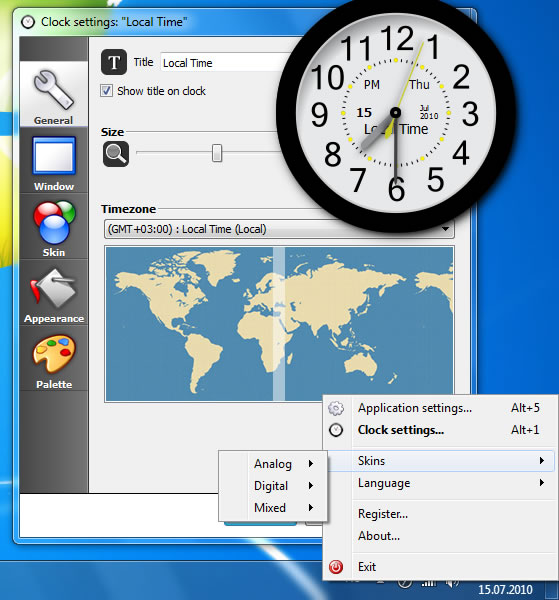
Easy-to-use clock for desktop with a great choice of skins. Installation package includes clock with more then 50 various skins. You can easily change the size of the clock without loss of rendering quality. There are a lot of options for fine-tuning: display the name on the clock, choice of timezone, transparency, display on the desktop or above all windows, shadows under clock and (or) hands, clock color and much more.
After installation you will see analog clock in the center of your desktop. To customize clock, just click on the appropriate button which appears when you hover the mouse over the clock. Quick access to skin change and application settings is available via desktop tray, where the Clock-on-Desktop icon always located.
If you want Clock-on-Desktop to startup automatically with operation system, open application settings window and use the corresponding option.
Like in all more featured versions, there is a support of 4 user interface languages: English, German, French and Russian. You can choose language during procedure of Clock-on-Desktop installation, or later using application settings.
Experiment and change a appearance of clock for the desktop as you like!
About Clock-on-Desktop Lite
This Clocks & Alarms program is available in English, French, German, Russian. It was last updated on 29 September, 2026. Clock-on-Desktop Lite is compatible with the following operating systems: Windows.
The company that develops Clock-on-Desktop Lite is Posibolt Software. The latest version released by its developer is 2010.3. This version was rated by 4 users of our site and has an average rating of 3.0.
The download we have available for Clock-on-Desktop Lite has a file size of 8.4 MB. Just click the green Download button above to start the downloading process. The program is listed on our website since 2010-07-22 and was downloaded 249 times. We have already checked if the download link is safe, however for your own protection we recommend that you scan the downloaded software with your antivirus. Your antivirus may detect the Clock-on-Desktop Lite as malware if the download link is broken.
How to install Clock-on-Desktop Lite on your Windows device:
- Click on the Download button on our website. This will start the download from the website of the developer.
- Once the Clock-on-Desktop Lite is downloaded click on it to start the setup process (assuming you are on a desktop computer).
- When the installation is finished you should be able to see and run the program.
Program Details
System requirements
Download information
Pricing
Version History
version 2010.3
posted on 2010-07-22
- Added periodic alarm type
- Added support for reminders, events and birthdays
- Added new task type for alarm system: show popup notification
- Ability to create reminders for events and birthdays
- Integrated personal diary and notes
- Integrated todo manager
- Added multilanguage support
